One thing we quickly learned during remote and hybrid learning involved the lack of understanding of screen iconology. We realized that our students needed to navigate the changing landscape of communication, not only for this unusual situation in pandemic learning, but also to understand the language of symbols on any digital device. It was one of those moments when adjustments to our instruction required a closer look at ensuring digital literacy to read and process crucial technology skills.
Source: ASIDE 2021
The pandemic emphasized just how much we took for granted our students' visual literacy of the icons that appear regularly in front of them. As with so much of visual literacy and thinking, graphicacy is the underpinning skill that our students require, and the need to educate learners beyond the written text in the illustrative and technological arts is essential.
The adjustments we made in the curriculum to build in skills for students to develop a range of pictorial proficiencies for decoding icons and their functionality paid off, particularly with our remote learners.
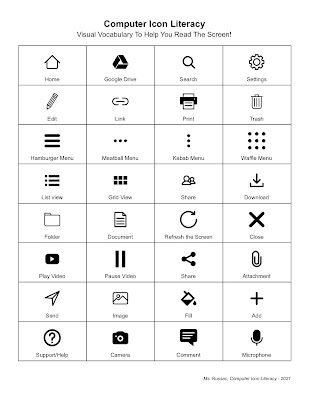
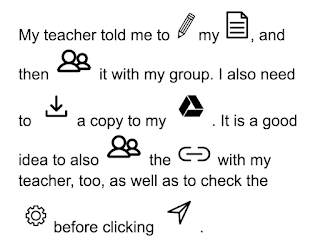
Visual fluency requires training and practice much the same as it does for reading; visual comprehension does as well. Today, students need to master multiple fluencies just as they do multiple literacies. Both require nurture and development to acquire these skills. We turned the learning process into a spy game for students to decipher the coded message using the icons. We provided a mentor text for them to grasp the idea and a one-page list of 32 icons to create their messages. Click here for a PDF version.
Source: Student Work
To save time, we set up a folder with small icons that we downloaded from the Noun Project in Google Drive that we shared with the students so that they could write their own coded messages. Click here for access to our icon folder. The students loved it.
This not only reinforced their learning of the icons, but it also allowed us to build in a variety of technology skills for retrieving the resources they needed from a shared folder, importing images into a Google Doc, and adjusting image size and text for readability. The students had a ball sharing their coded messages with each other, and we had the results we were looking for in developing the their digital device iconology.
Now in its fifth year, the 2015 SXSWEdu rally in the Texas midland is more inclusive than ever. The panelpicker judges eschewed trendy topics like flipped learning and Big Data in favor of deeper discussions about Social Emotional Learning and Gamification. Major themes that ran through the first day included programming in schools, authentic PBL, and contemporary professional development.
A major highlight of the day was hearing about the impressive Coded Curriculum implemented by Beaver Country Day School in Chestnut Hill, Massachusetts. The school has embraced a "launch / test / refine" approach to incorporate coding into every academic discipline. The faculty actively seeks to "make excellent mistakes" as they teach children the "New Basics" of open-ended problem solving, non-linear thinking, and collaboration.
Another centerpiece of the sessions was Sunni Brown's mesmerizing workshop about "how to stay curious." A guru of visual thinking and a doctor of doodling, Brown reminded the crowd that visual language is a river native to cultures across the world that instills a powerful cognitive awareness.
The spirit of sharing was genuine today at SXSWEdu. Every attendee was universally open and eager to connect. Yet a question kept trickling through the meandering hallways like the incessant drip of Austin’s rain: How many actual classroom teachers were present at the conference? When Brown asked how many classroom educators were in the room, fewer than ten percent among the hundreds raised their hands.
Source: ASIDE 2015
Throughout the day, we met: an online charter school principal, a start-up edupreneur, an NAACP coordinator, a not-for-profit founder, an NEA staffer, a Museum and Library Services researcher, a corporate communications director, a Learning Sciences professor, a former math instructor in Ethiopia, and a doctoral candidate who moonlights at Khan Academy. We met other interesting people, too, but we did not meet one classroom teacher.
We know they were there. But they seemed few and far between. Maybe this is a good thing. Maybe it signals that SXSWEdu is not for everyday teachers. Maybe the passionate attendees perceive a sea change in education that is more galvanizing than "regular" teachers can see. Or maybe not.
Either way, it speaks to a road diverging in a not-yet-understood wood. If start-ups and online outlets are careening onto their own edtech on-ramp, what happens to the students and teachers driving in the HOV lane?
For example, after participating in one session about a full-scale coding curriculum pushed across all disciplines, we attended a completely different panel about whether edtech really offers any solution at all. It feels strange that this question is still being asked: Is edtech a panacea or a distraction?
The nuanced nature of this tacit tech tug-of-war reminded us of a General Electric ad from September 2014 called "The Boy Who Beeps." The touching ad follows the birth of a baby who can speak the language of technology. The commercial intends to tout GE's omnipresence in electronics, but to us it highlighted the children today who are always plugged in, always wired.
Kids are born who can seemingly speak to machines, communicate with the digital world, control their own access to e-learning. What happens, though, when their days become disconnected? Can they muster the skills to navigate a tangible, interpersonal world? Or better yet, can they make things, create their own machines? Are they controlled by the very machines they rely on? And what about children who don’t have machines?
In the edtech learning space, are there start-ups who talk only to machines – and not to educators? And what about the teachers who cannot (or will not) talk to machines, who can’t negotiate the apps and iPads filling their classes?
By the end of today, we were encouraged. We decided that educators are indeed emerging as a potent force in the digital economy. American Federation Of Teachers President Randi Weingarten noted a change since last year's SXSWEdu. She now hears tech companies asking, “How can we get teachers involved in the process?” She emphasized that with the onslaught of shiny edtech tools, the best advice is to know how to teach first, and to learn to use technology second. Brown echoed the same, saying that digital tools are great, but they're not worth much if we can't use them. The learning is the key.
The increasing use of technology to deliver information means the traditional bulletin board is going the way of the newspaper. While teachers still display student work in traditional venues, they can also seek alternate, virtual opportunities to share projects with peers and parents. Publishing student work motivates them to see, share, and engage in the collective consumption of ideas. Simple, free digital tools make it easier than ever to display content online. Collaborative whiteboards, digital fliers, and virtual pinboards can exhibit student creations with creative design.
Source: ASIDE, 2014
Embedding content in a paperless environment promotes active and continuous discussions about accountability and digital citizenship. Our students are growing up in a world that is always-engaged, always-on, and always-connected. We need to foster dynamic learning networks that take advantage of these tools to help them navigate, curate, and publish their work.
Source: ASIDE, 2014
The increasing move toward 1:1 and BYOD programs has also pushed the speed and availability of information to mobile environments. It is important to employ app smashing and other interactive ways to engage with student work that builds on the collective feedback of teacher to student, student to student, and student to teacher.
Designing information is at the core of our D-LIT approach to learning. Using design, literacy, information, and technology together builds a better understanding of content for students. Having flexibility and choice over how to present their information allows them to own it. As in our earlier posts about D-LIT using Storybird and Voicethread, Voki is another Web 2.0 tool that is easy to use in the classroom. Voki lets users design speaking avatars that can be shared and posted on the web. Its ease of use makes for a simple way for students even in the younger grades to publish content about what they are learning. Voki has a host of different characters to choose from to create the avatars, complete with a multitude of voices. Voice information can be typed, avoiding the problems that come with trying to record an entire class. The message, too, is limited to a certain amount of characters, similar to a “tweet.” Voki Classroom also allows teachers to set up an account with a “Teacher ID” for their classes for a nominal fee. With a classroom account, students do not need to sign up, and the teacher can add and manage the account.
Two content areas in which we had students use Voki were for our digital literacy and media literacy units. It can, however, be applied to any area across the curricula. In our efforts to promote digital, savvy students on the importance of personal information and online safety, Voki became a perfect tool to present their digital tips to their fellow classmates. The choice in allowing students to create the content to teach others was a motivating factor in making this project successful. A selection of these talking avatars was also chosen to share with others at an all-school assembly about online safety and cyberbullying. Their messages were clear, concise and to the point. The students were also proud to present their messages.
We also used Voki as part of our media literacy unit called “Question It.” Students created avatars to question advertising, understand media industry lingo, and promote awareness when viewing different types of media. Each student was given the task to design a talking avatar to present their information on their specific topics, including television, music, movies, magazines, computer games, news reports and online. It was a successful way for each group to present their information, not only to their own classes but also to younger students, using their Voki avatars to teach about media literacy.
Using Voki, just like other Web 2.0 tools such as Storybird and VoiceThread, was another way to get kids “juiced” about learning. The students created more than required when authoring and publishing their digital and media tips. They took pride in designing information, because they owned it. On top of that, they learned the content that was sparked by their own creativity. Voki was a way to “educate, engage and enjoy” what they were learning using D-LIT.




)